Now on iPhone and Android
Discipleship, wherever you go.
Mark a practice completed in one tap on your phone, pray together from anywhere, and get a gentle nudge when your partner is thinking of you.


The same walk as the web app. Sign in and it's all there.
Inside the app
Seven screens. One person beside you.
Walk with a friend, a mentor or your spouse, and keep a few practices side by side. Here's a week in the discipleship app, from the first invite to Sunday's look back.
01Invite
Pick one person.
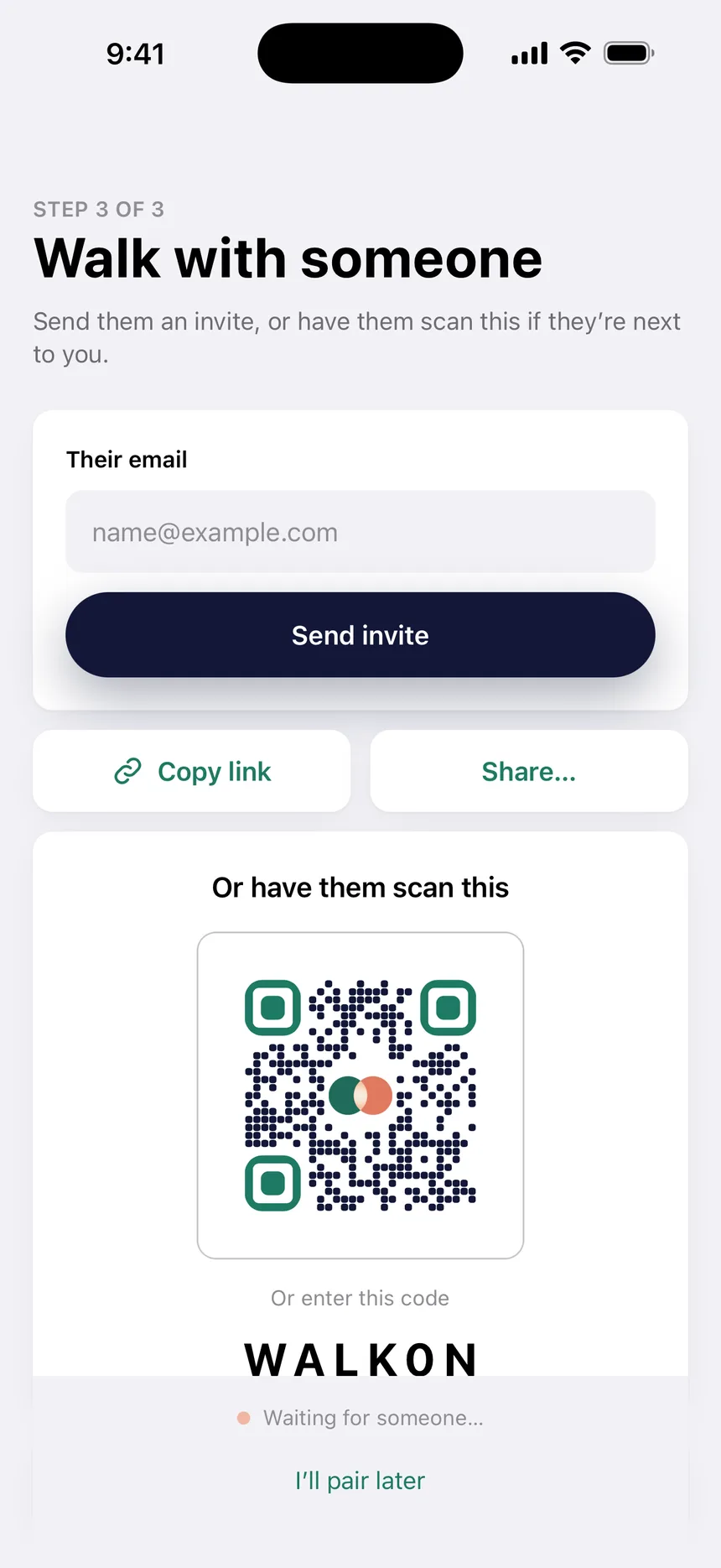
Start a walk and invite a friend, a mentor or your spouse. Send a link, share it from your phone, or have them scan a code if they're sitting next to you.
- Email an invite, copy a link or open the share sheet.
- Next to each other? They scan the code with their camera.
- Invite links open straight into the app.
02Today
Two quiet marks a day, side by side.
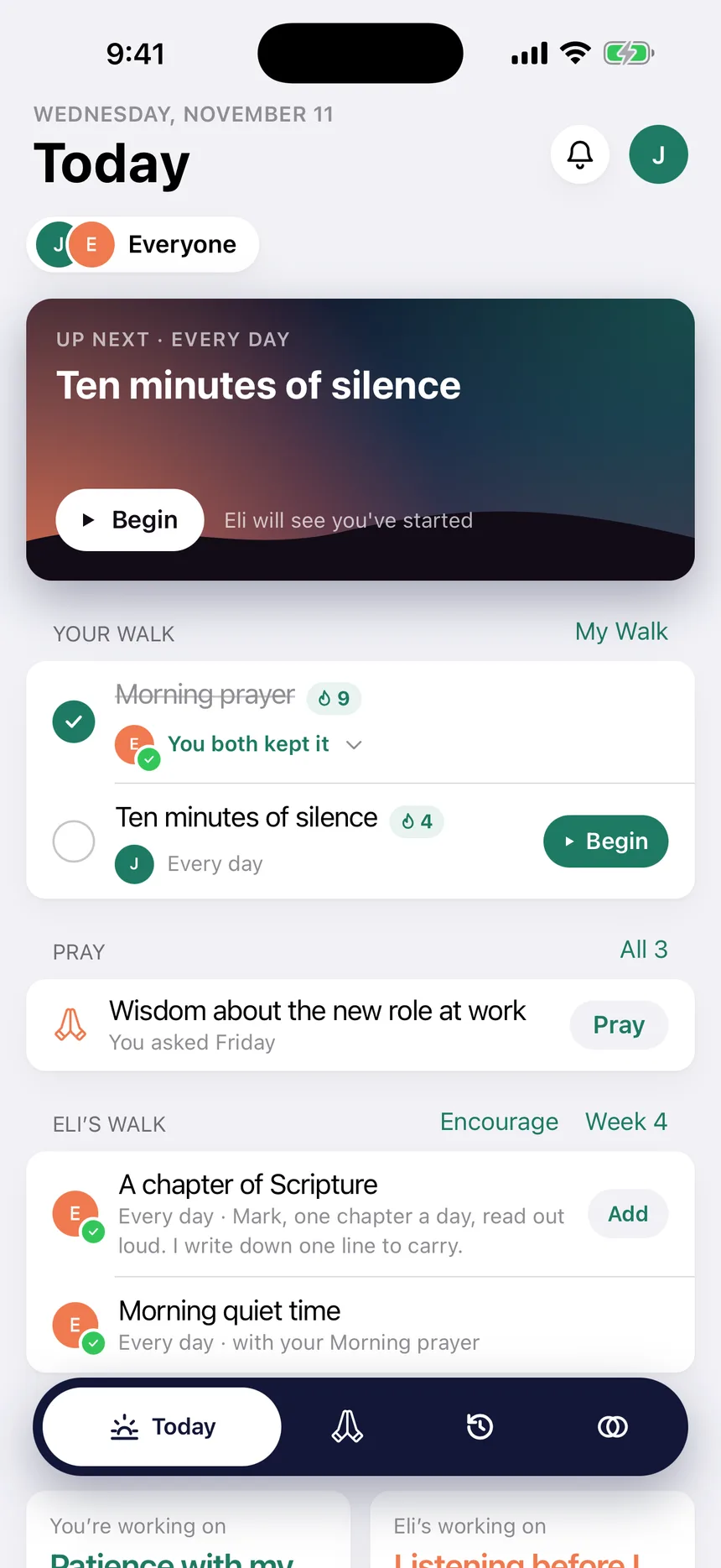
Today shows what's next and what's left. Tap the circle when you've kept a practice, and feel the phone tap back. Eli's mark shows up next to yours.
- Up next sits on top with a Begin button, so starting takes one tap.
- Streaks cheer you on. A missed day is an empty circle, never a red X.
- Eli's walk sits underneath. Like how he keeps a practice? Add it to yours.
03Begin together
Pray in the same quiet, from two places.
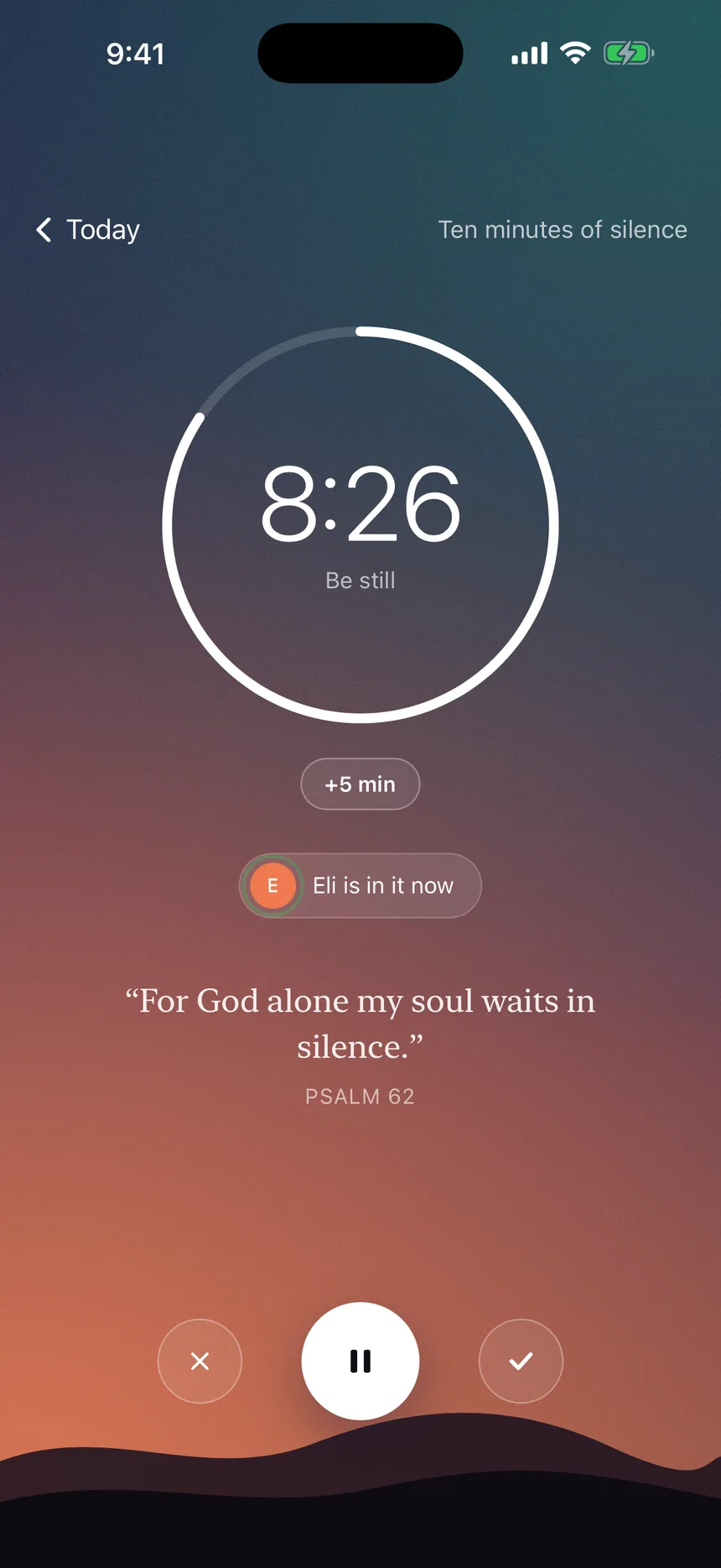
Tap Begin and the screen goes still. A timer, a line of a psalm, and nothing else. When Eli starts too, you'll see him there.
- Silence gets a timer. Add five minutes when you want more.
- Eli sees that you've started, and you see when he's in it now.
- Pause, or finish when you're ready.
04Pray
Carry each other.
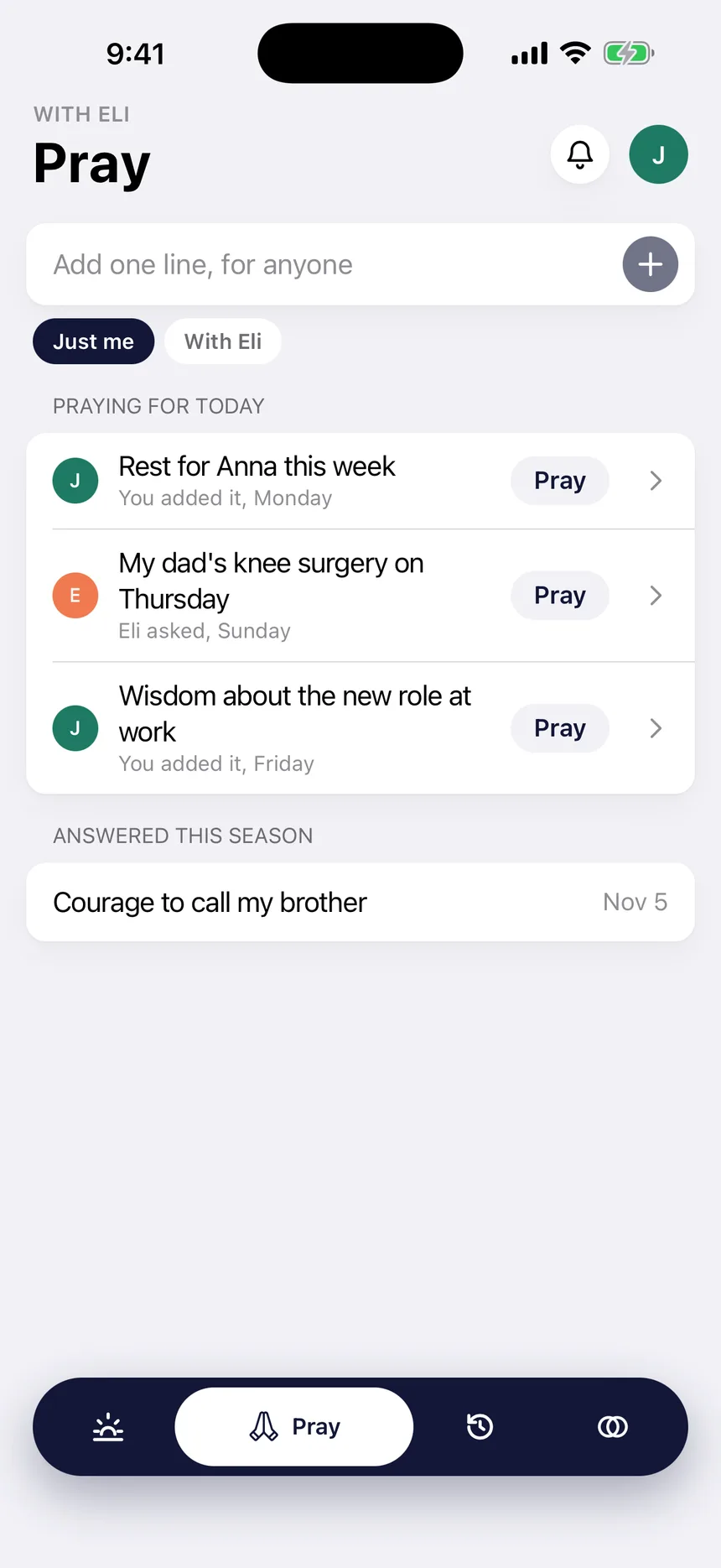
One list for what you're praying about. Keep a request to yourself, or put it in the walk so Eli carries it with you.
- Add a line in seconds, for anyone.
- Choose Just me or With Eli on each request.
- Answered prayers stay on the list, so you can look back on the season.
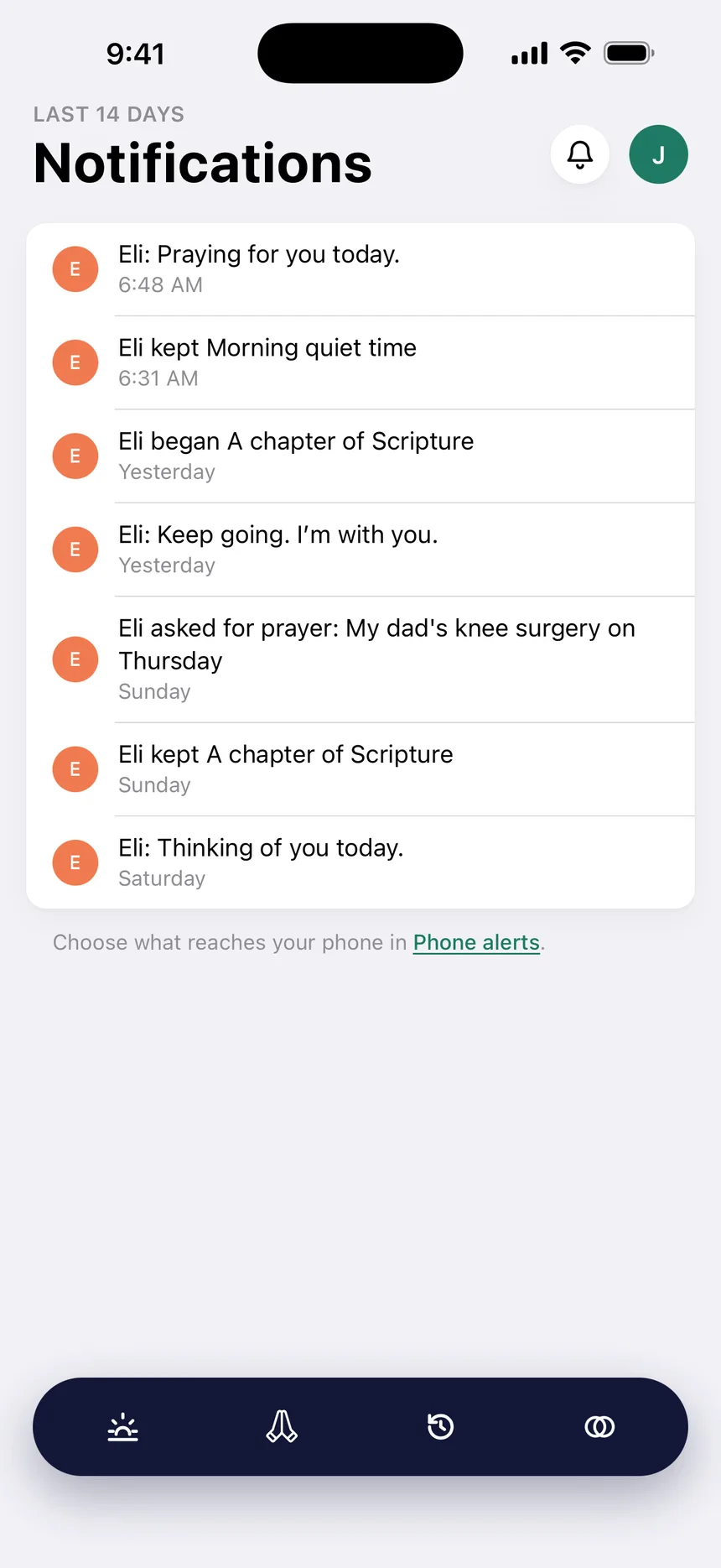
05Encourage
A nudge from someone who knows you.
Reminders you set yourself, and word from Eli when it matters: he kept a practice, began a session, asked for prayer, or wanted you to know he's with you.
- Send Eli a quick word, like Praying for you today.
- Choose exactly what reaches your phone in Phone alerts.
- No feed to scroll and nothing to catch up on.
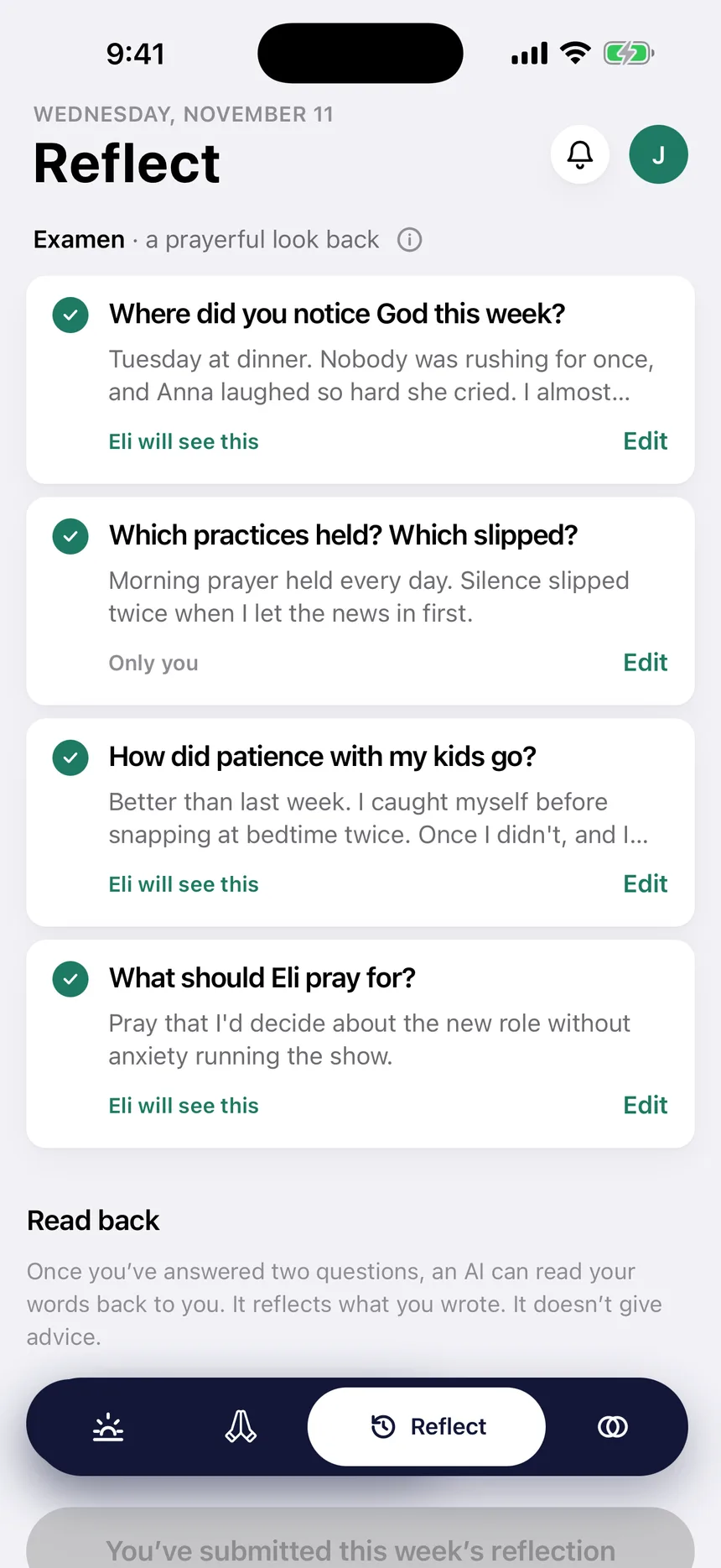
06Sunday reflection
Once a week, look back together.
Four short questions on Sunday. Where did you notice God? Which practices held, and which slipped? How did your focus go? What should Eli pray for?
- Every answer is private until you flip its switch.
- Share one answer and keep the rest. You decide per answer, not per week.
- Ask for a read back and an AI reflects your own words to you. It never grades anyone.
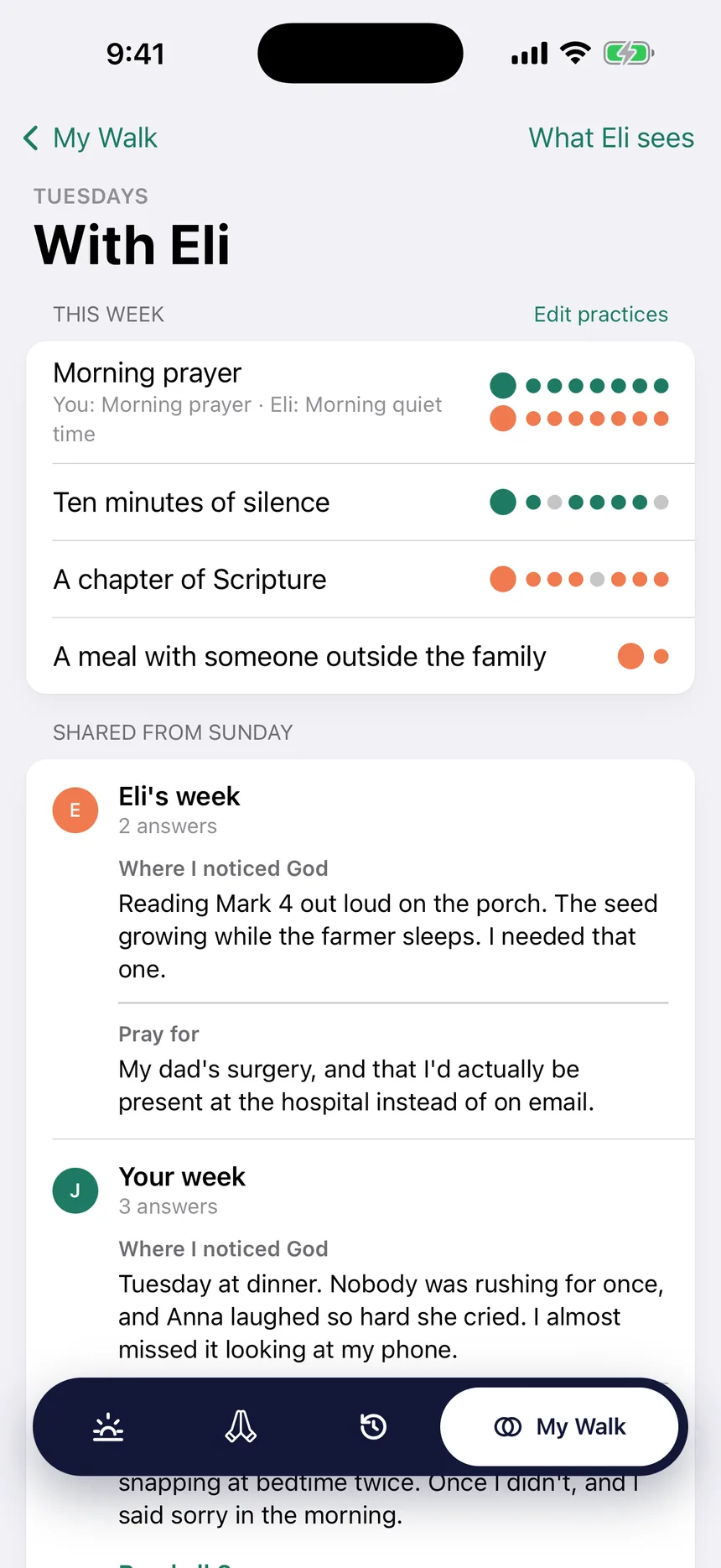
07My Walk
Walk into the conversation already knowing what to ask.
My Walk puts the week on one page: each practice as a row of dots, yours and his, and everything you both shared from Sunday.
- Marks for the week as dots, side by side.
- Every shared reflection answer in one place.
- Check What Eli sees anytime. Nothing else is shown.
Built-in practices
Practices your tradition already keeps.
Start from fourteen kinds of practice, named the way your tradition names them, or write one in your own words. When you and your partner keep the same kind, the app lines them up side by side.
Morning prayer
- Morning quiet time
- Shacharit from the siddur
- Morning Prayer from the Daily Office
- Liturgy of the Hours
Scripture
- A chapter of Scripture
- A psalm a day
- The weekly Torah portion
- The day's lectionary readings
Prayer
- Walk and pray
- The Rosary
- The Jesus Prayer
- The Covenant Prayer
Silence
- Ten minutes of silence
A day of rest
- A Sabbath day of rest
- Shabbat, sundown to sundown
- Rest on the Lord's Day
Evening prayer
- Compline before bed
Fasting
- Fast one meal
- Keep the Friday fast
Praying for others
- Pray for someone by name
The examen
- The daily examen
Study
- Memorize a verse
- One catechism question
Worship
- Worship before you pray
Fellowship
- Have someone over
- Meet with your band
Generosity
- Give something away
Grace at meals
- Blessings before meals
Made for your phone
The small things a phone does well.
Reminders you choose
Set the nudges you want and turn off the rest. They arrive as notifications, not emails.
Scan to pair
Your camera reads an invite code right on the phone. Nothing is uploaded.
Links that open the app
Tap an invite in a text or an email and it opens in the app, ready to join.
Share your invite
Send your invite through any app on your phone with the share sheet.
A tap you can feel
Mark a practice or pray for a request and the phone taps back.
One walk, every screen
Mark it on your phone, read Sunday's answers on your computer. It's the same walk.
No ads. No feed. Nothing sold.
Your partner sees what you mark and what you choose to share. Everything else stays with you. Export your data or delete your account from Account at any time.
Questions
About the discipleship app.
Does Disciple.app work on iPhone and Android?
Yes. Download it from the App Store or Google Play. It's the same walk as the web app at walk.disciple.app, so you can mark a practice on your phone and read Sunday's answers on your computer.
Do both of us need the app?
No. One of you can use the app and the other the browser. An invite link opens in the app when it's installed and in the browser when it isn't.
How is it different from other discipleship apps?
Most discipleship apps follow a course or serve a whole church. Disciple.app is for walking with people you know: keeping a few practices side by side, praying for each other and looking back together every Sunday. It works with whatever your tradition teaches.
Is it an accountability partner app?
In the best sense. You walk with someone who sees the practices you mark and the answers you choose to share, and you see theirs. It isn't monitoring software: nothing on your phone is tracked or reported.
What is the Sunday reflection?
Four short questions each Sunday: where you noticed God, which practices held, how your focus went and what your partner should pray for. Each answer stays private until you share it. Catholics and Anglicans see it called the examen.
Take your walk with you.
Get the discipleship app for iPhone or Android, sign in, and walk with someone this season.